
Metal Detectors vs. Modern Weapons Detection: What’s the Difference for K-12?
Every school day starts with a familiar routine. Students arrive with backpacks, teachers prepare their classrooms, and staff members manage the steady flow of people entering the building. For K-12 administrators and district leadership teams, there’s another important consideration happening behind the scenes: making sure school security measures are effective without unnecessarily disrupting the learning environment. That’s where questions about metal detectors in schools and newer weapons detection technologies often begin.
Traditional metal detectors, modern weapons detection portals, and AI-powered firearm detection systems serve different security functions. Traditional walk-through metal detectors identify metallic objects passing through a screening checkpoint, while advanced systems may be configured to prioritize certain metallic threats and support higher-volume screening. AI-assisted firearm detection works differently by analyzing video footage for visible firearms rather than physically screening people.
For school districts evaluating these options, several distinctions matter:
- Traditional screening requires checkpoint management: Walk-through metal detectors identify metal and may require students to remove certain belongings or undergo secondary screening.
- Modern portals can support different entry procedures: Systems such as OPENGATE are designed to screen people carrying backpacks and other personal items with less unnecessary interruption.
- AI-powered detection monitors video: These systems analyze compatible camera feeds for visible firearms and generate alerts based on configured detection and verification procedures.
- No single technology addresses every security concern: Effective school security requires appropriate policies, trained personnel, access control, communication systems, and coordinated response procedures.
At Communications Technologies, Inc. (CTI), we help educational institutions evaluate and integrate security technologies according to their facilities and operational needs. We offer OPENGATE walk-through weapons detection and AI-powered firearm detection solutions that can complement broader school security systems for districts across the country.
How Are Traditional Metal Detectors Different From Modern Weapons Detection Systems?
Traditional metal detectors differ from modern weapons detection systems primarily in how they identify metallic objects and how screening is managed. Conventional walk-through equipment responds to metal passing through a detection field, while certain newer systems emphasize detection of configured metallic threats, higher pedestrian throughput, and reduced handling of everyday belongings.
How Traditional Walk-Through Metal Detectors Work
Traditional walk-through metal detectors use electromagnetic sensing to identify metal carried through a screening portal. Depending on the equipment and its configuration, a detected object may trigger an audible or visual alert.
However, these systems do not automatically determine whether every metallic object represents a weapon. Keys, certain electronic devices, belt buckles, and other belongings may generate alarms.
For schools, that means administrators must consider how students will move through checkpoints and what happens when an alarm occurs. Secondary screening procedures, staff training, and consistent communication all influence how well the system works during morning arrival.
How Modern Weapons Detection Portals Work
Modern weapons detection portals can use specialized electromagnetic analysis to screen for selected metallic threat characteristics. Some systems are designed to help people move through checkpoints while carrying ordinary belongings, although actual performance depends on the equipment and configured security requirements.
These capabilities can be particularly valuable for campuses where hundreds or thousands of students arrive within a relatively short period. Reducing unnecessary interruptions may help maintain a more orderly entry process.
However, modern detection portals still have operating limitations. Their ability to detect particular objects depends on factors such as material, size, orientation, configuration, and screening conditions.
What Is OPENGATE, and How Does It Work in K-12 Schools?
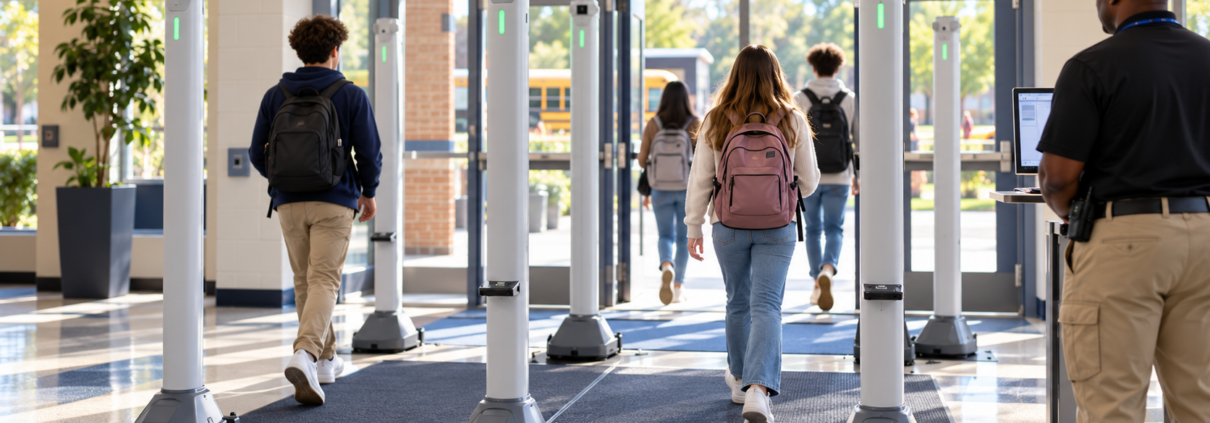
OPENGATE is a portable walk-through weapons detection system developed by CEIA that screens people in transit for configured metallic threats. Its two freestanding pillars use electronic analysis to detect selected weapons-related metal characteristics while supporting screening of students carrying backpacks, purses, and other everyday belongings.
A Different Approach to School Entrances
Unlike conventional arch-style walk-through metal detectors, OPENGATE uses two independent pillars without a connecting overhead structure. Its wire-free design makes it possible to position the equipment at appropriate screening locations without permanent architectural installation.
The system provides audible and visual alarm indicators to notify staff when a detected object meets the configured alert criteria. School personnel remain responsible for determining what happens next.
At CTI, we offer OPENGATE as an option for schools evaluating more flexible physical screening methods. Its portability may be useful when districts need screening at different entrances or scheduled campus events.
Supporting Student Traffic Flow
One concern with metal detectors in schools is how screening affects the beginning of the school day. Long lines and repeated searches can create logistical challenges, particularly at larger campuses.
OPENGATE is designed for high-throughput screening and may allow many students to keep ordinary belongings with them during the process. However, specific items can still trigger alerts, and schools must establish appropriate procedures for handling those situations.
The system can be used indoors and outdoors when conditions meet its operating requirements. This flexibility may support different campus arrangements, including school entrances and athletic events.
How Does AI-Powered Firearm Detection Work Differently?
AI-powered firearm detection works by analyzing video from compatible surveillance cameras to identify visual characteristics associated with firearms. Unlike physical screening equipment, it doesn’t detect concealed objects through electromagnetic sensing or require someone to pass between two detection pillars.
Understanding AI-Assisted Video Analysis
AI-assisted firearm detection software examines supported video feeds for recognizable firearm imagery. When the system identifies a potential firearm, it can generate an alert for verification or other actions according to its configuration.
This means its performance depends partly on camera coverage, image quality, lighting, visibility, and whether the object can be recognized in the footage. A concealed firearm that isn’t visible to the camera cannot be identified through visual analysis alone.
At CTI, we offer Omnilert AI-powered firearm detection technology as a separate security solution from OPENGATE. It is designed to work with compatible camera systems and support rapid awareness when a potential firearm is visually detected.
Connecting Detection With Emergency Notifications
AI-assisted detection becomes more useful when schools establish what should happen after a potential threat is identified. Depending on the deployment, alerts may be routed for human verification before authorized response procedures begin.
Omnilert supports configurable workflows that can include notifications and integrations with other building safety systems. These capabilities require appropriate planning, compatible infrastructure, and established response protocols.
The distinction is important because an AI alert doesn’t independently confirm every event or guarantee a particular outcome. Trained people and clearly defined procedures remain essential.
How Do These Three School Screening Technologies Compare?
Traditional metal detectors, modern weapons detection portals, and AI-assisted firearm detection differ in their sensing methods, locations, and operational roles. For K-12 decision-makers, comparing these functions can help determine whether a district needs entrance screening, video-based monitoring, or a coordinated combination of both.
| Feature | Traditional metal detectors | OPENGATE weapons detection | AI-assisted firearm detection |
|---|---|---|---|
| Detection method | Electromagnetic metal sensing | Specialized electromagnetic analysis of metallic threats | Visual analysis of camera footage |
| Primary location | Designated screening checkpoint | Designated portable screening checkpoint | Areas covered by compatible cameras |
| Concealed metallic objects | May trigger alarms depending on settings | May trigger alarms depending on target and configuration | Cannot visually identify fully concealed objects |
| Backpacks and belongings | May require additional handling | Designed to support screening with many belongings carried | Does not physically screen bags |
| Primary output | Alarm for further assessment | Audible and visual alert for further assessment | Potential firearm alert and optional response workflows |
| Human involvement | Staff interpret and resolve alarms | Staff interpret and resolve alarms | Authorized personnel verify and respond to alerts |
These technologies should not be treated as interchangeable. Each answers a different security question, and district leadership should evaluate which function addresses its identified needs.
What Operational Challenges Should Schools Consider Before Installation?
Schools should consider arrival volume, staffing, checkpoint placement, accessibility, and response procedures before selecting school screening technology. These factors can influence the effectiveness of screening just as much as the equipment itself, particularly in districts operating multiple buildings with different layouts.
Student Arrival and Entry Procedures
A smaller elementary school may have very different screening needs from a large high school. The number of entrances, arrival schedules, transportation patterns, and expected visitor volume all affect equipment placement.
Districts should evaluate how screening fits into existing arrival procedures. A pilot or demonstration may help identify practical issues involving congestion, alarm frequency, and staff responsibilities.
Accessibility and Student Experience
Screening policies should account for students and visitors with disabilities, medical devices, and other accessibility needs. Schools should establish appropriate alternative procedures and follow applicable requirements rather than assuming one screening method works for everyone.
Clear explanations to families and staff can also support a more consistent experience. Technology works best when people understand what to expect and how concerns will be handled respectfully.
Staffing and Training
Every screening system requires a response to alerts. Even when technology reduces certain unnecessary alarms, trained personnel must understand how to interpret signals, manage exceptions, and follow district-approved procedures.
Administrators should consider training, operational coverage, equipment maintenance, and the responsibilities of authorized security personnel before moving forward.
How Can Weapons Detection Integrate With Existing School Security Systems?
Weapons detection can complement existing school security systems by providing additional information that supports access management, monitoring, and coordinated emergency response. For school districts nationwide, integration planning should focus on practical workflows rather than assuming every security platform automatically communicates with every other system.
Video Surveillance and Monitoring
Security cameras provide visual information about designated campus areas. When paired with compatible AI-assisted detection software, certain video feeds can also support automated identification of potential visible firearms.
However, camera placement and system compatibility matter. Schools should confirm which equipment is supported, what the software can identify, and how alerts are reviewed.
Access Control and Entrance Management
Electronic access control systems help schools manage who can enter designated areas. Physical weapons screening can complement those controls by adding a checkpoint assessment for individuals entering through selected locations.
Neither technology replaces the other. Access control addresses entry authorization, while screening examines specific detectable objects under established procedures.
Emergency Notifications and Response
Emergency notification systems help distribute information to designated personnel when an incident requires action. AI-assisted detection platforms may support automated workflows or alerts when appropriately integrated.
Schools must determine who receives those alerts, how information is verified, and what actions authorized personnel should take. Those decisions belong within a broader emergency operations plan developed with appropriate school and public safety stakeholders.
What Common Mistakes Should Districts Avoid When Choosing Screening Technology?
Common mistakes include comparing technologies solely by marketing language, overlooking staffing requirements, and assuming one device can detect every possible threat. School leaders should evaluate verified capabilities, operational limitations, and the realities of daily campus activity before selecting equipment.
One mistake is assuming that every modern weapons detection portal can identify every weapon regardless of its material or configuration. Detection capabilities vary, and schools should request demonstrations based on manufacturer-supported operating conditions.
Another mistake is treating AI-assisted video detection as a substitute for physical screening. Video-based systems rely on visual information and cannot inspect concealed belongings.
Finally, avoid purchasing equipment before defining response procedures. Alerts are only useful when authorized staff know how to interpret them and follow appropriate protocols.
What Might a School Security Evaluation Look Like?
A school security evaluation might begin with a district reviewing its existing entrances, camera coverage, daily arrival patterns, and emergency communication procedures. Administrators could then identify where physical screening or video-assisted detection would provide a useful additional capability.
For example, an illustrative high school might consider portable screening at a main student entrance while also evaluating AI-assisted detection for compatible surveillance cameras. District leaders would review staffing needs, privacy considerations, training requirements, and integration options before deciding whether either technology fits their operational plan.
This is a hypothetical planning scenario rather than an actual CTI customer project. It demonstrates why selecting school screening technology should begin with campus needs rather than assuming a particular product is automatically the right choice.
How Can CTI Help Schools Evaluate Weapons Detection Solutions?
CTI can help school districts evaluate weapons detection by reviewing the intended application, discussing equipment capabilities, and considering how new technology may work alongside existing security infrastructure. Our integrated approach emphasizes selecting appropriate solutions rather than treating physical screening and AI-assisted detection as identical products.
Our weapons detection offerings include CEIA OPENGATE for physical screening and Omnilert for AI-powered visual firearm detection. We can discuss how these technologies relate to surveillance, access control, and emergency communication systems.
We work with educational and institutional decision-makers across the country who are evaluating integrated security solutions. Whether a school serves a smaller student population or a district operates multiple campuses, the discussion should begin with its particular facilities, policies, and operational requirements.
Request a School Weapons Detection Consultation
Frequently Asked Questions About Metal Detectors and Weapons Detection in Schools
What is the difference between metal detectors and weapons detection systems in schools?
Traditional metal detectors identify metallic objects passing through a checkpoint, while some modern weapons detection portals are designed to prioritize configured metallic threats. Both use physical sensing rather than ordinary video footage. AI-assisted firearm detection is different because it analyzes images from compatible cameras for visible firearms.
Does OPENGATE require students to empty their backpacks?
OPENGATE is designed to support high-throughput screening while many students carry their backpacks and everyday belongings. However, certain items may still trigger alerts depending on system settings and object characteristics. Schools should establish procedures for secondary screening and follow the manufacturer’s operational guidance.
Can AI-powered firearm detection identify concealed weapons?
AI-powered visual firearm detection cannot identify a firearm that is completely concealed and not visible in the camera footage. It analyzes supported video feeds for recognizable firearm imagery. Detection performance depends on visibility, camera placement, image quality, software capabilities, and configured review procedures.
Are modern weapons detection systems suitable for elementary schools?
Modern weapons detection systems may be considered for elementary campuses, but suitability depends on the school’s risk assessment, layout, student population, staffing, and operating procedures. Younger students may require additional assistance during screening. Districts should also evaluate accessibility, family communication, and whether the technology addresses a clearly identified need.
Can OPENGATE be moved between different school buildings?
Yes, OPENGATE is designed as a portable system with two freestanding pillars, making relocation possible when site conditions and operating requirements permit. This may be useful for districts managing multiple entrances or scheduled events. Staff still need appropriate training and established screening procedures at each location.
Does AI-assisted firearm detection replace security cameras?
No, AI-assisted firearm detection generally works with compatible surveillance cameras rather than replacing them. The software analyzes available video feeds and can generate alerts when potential firearms are visually identified. Camera coverage, system compatibility, and appropriate response procedures remain important parts of the deployment.
Can weapons detection connect with school emergency notification systems?
Certain weapons detection platforms can support integration with emergency communication and response technologies. Omnilert, for example, offers configurable alert and response workflows that may connect with compatible systems. Actual integration capabilities depend on the equipment, software, network environment, and district-approved procedures.
How should school districts compare weapons detection providers?
School districts should compare verified detection capabilities, operating limitations, throughput, staffing requirements, accessibility, training, system compatibility, and total ownership costs. Requesting demonstrations and reviewing manufacturer documentation can help clarify expectations. Technology should be evaluated as one part of a broader school safety strategy.
Build a More Connected Approach to K-12 School Security
Choosing school security technology involves much more than deciding whether to place a detector at the front entrance. Administrators must consider student arrival procedures, staffing, accessibility, existing infrastructure, and the practical response to an alert. Traditional metal detectors, modern weapons detection portals, and AI-assisted firearm detection systems offer different capabilities, and understanding those differences is essential for making informed decisions.
At Communications Technologies, Inc., we help educational organizations explore security solutions that fit their operational needs. Through our OPENGATE and AI-powered firearm detection offerings, we can assist school districts in evaluating physical screening, video-based monitoring, and opportunities for integration with other campus safety technologies. Our goal is to help decision-makers understand what’s possible, recognize important limitations, and develop a coordinated approach that supports safer, more manageable school operations. Contact CTI today to discuss your campus needs.